
Welcome to a new post!
This time it’s about something small: the README on my GitHub profile. I wanted it to be simple, a GIF that says something about me, a bit nerdy but not overdone, a short description and little else. It ended up taking a lot longer than it had any right to.
The idea
The starting point was Pokémon Emerald’s intro: the character rides a bike while a handful of Pokémon run alongside, right before the credits. I’ve always liked that scene, so I wanted something in the same spirit, personalized, but recognizably the same idea. Simple in theory.

First attempt: Aseprite
I downloaded Aseprite because I’d wanted an excuse to learn it for a while. While I got familiar with it, I asked Claude to rip the sprites out of pokeemerald, the decompilation project. I didn’t have much faith it would go anywhere, but it did it well: it pulled the sprites out reasonably organized, in pieces, then stitched them back into several spritesheets, and did the same for the backgrounds of the different scenes, urban, sea and forest.
I asked if it could rebuild the original scene in Aseprite, and it managed that too. That’s when I hit the actual problem: Aseprite works frame by frame. There’s no way, as far as I know, to move something freely between arbitrary keyframes and have it interpolate; you draw or place each frame by hand. Fine for spriting, not for choreographing a camera and actors over hundreds of frames.
Plot twist
So I asked for the same scene to be built directly from a JSON with the actors’ data and positions, taken straight from the game. It matched the original almost exactly. And that’s when the idea I actually wanted showed up: what if I turned an afternoon project into a week-long one?
That’s how the Parallax Scene Editor was born. I asked for a web page that would work with sprites and a JSON describing the scene, and we iterated from there. Two constraints from the start: everything local, and it had to write directly to disk, not to some app-only state you export by hand at the end.
The editor
Parallax
Before going further, a quick aside for anyone unfamiliar with the term. Parallax is the age-old trick for faking depth in 2D. Instead of a single background, you stack several layers (sky, mountains, trees, ground…) and each one moves at its own speed, the far ones slower, the near ones faster. The eye reads that difference in speed as distance, even though underneath it’s just flat sprites. It’s the same technique 16-bit games used, and the one Pokémon Emerald uses in its intro.
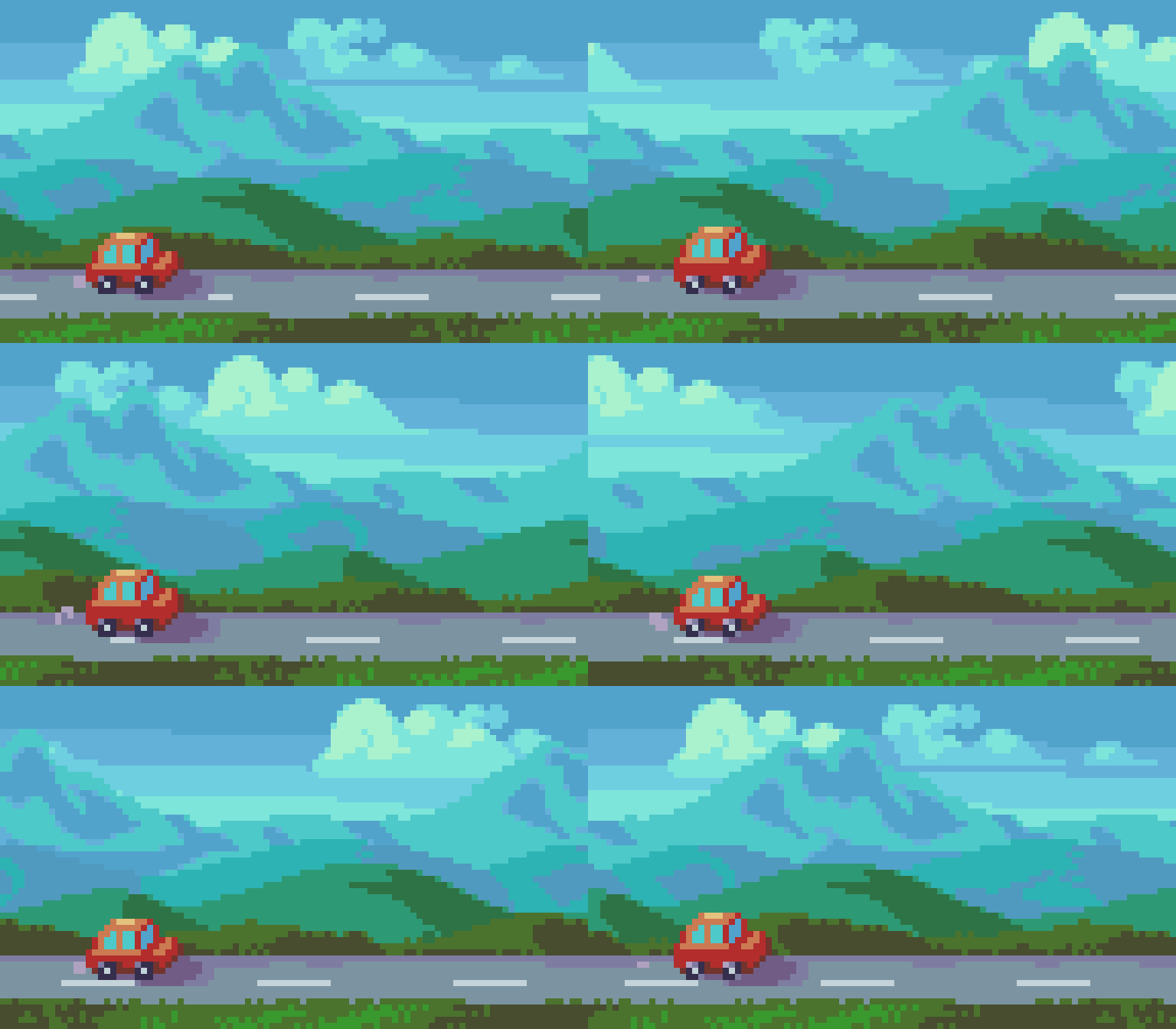 Example from slynyrd.com, which has a whole post well worth reading on drawing parallax scrolling in pixel art.
Using the editor
As always, here’s the editor’s repo with the source code for anyone who wants to poke around.

christt105/parallax-scene-editor
Browser-based editor for seamlessly looping pixel art parallax scenes. Serverless, zero uploads.
Let’s see how this little tool works.
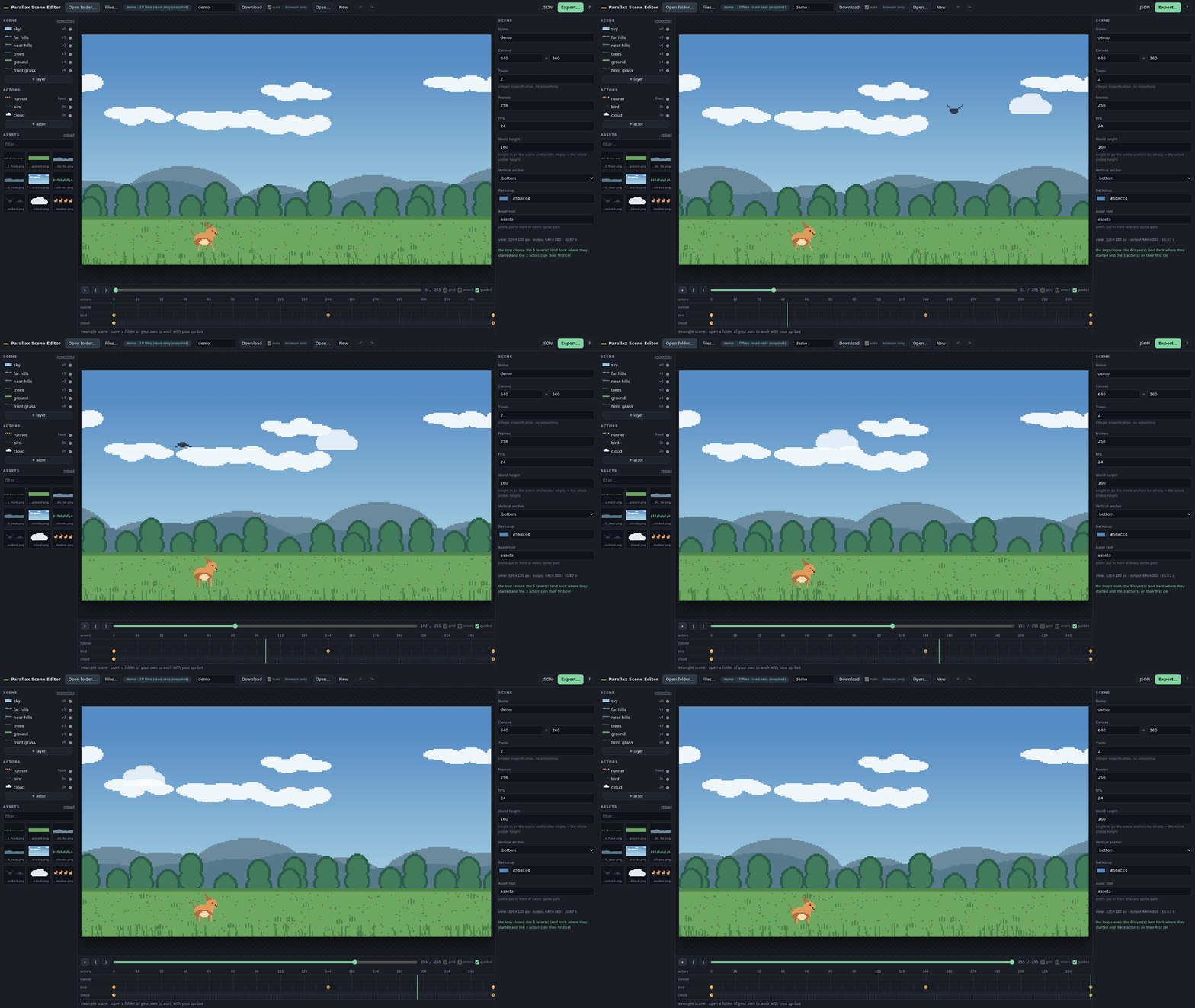
A parallax scene here is one JSON file: camera, layers, actors, keyframes. You edit it while it plays on a loop, and it tells you in red the moment something won’t close cleanly. Some of what it ended up doing:
- Reads and writes straight to your disk. You open a folder with the File System Access API (Chromium only) and from then on every change is written back to the same file a few hundred milliseconds after you stop touching it. A pill next to Save always says where it’s writing.
- Sprites reload themselves. Repaint something in Aseprite, hit save, and a couple of seconds later it’s already on the canvas, with no action from you.
- Keyframed actors with easing, plus
sine/cosine/wobblemotion stacked on top for the little touches, a bounce on the bike, a bird bobbing mid-flight, without hand-drawing it. - It does the loop-closing arithmetic for you. If a layer’s speed won’t tile cleanly, or an actor’s cel count won’t divide evenly into the loop, the editor doesn’t just flag it, it offers the exact fix: the two nearest speeds that do close, or a new loop length, with a button for each.
- Onion skin, a draggable timeline, undo history, the usual things you’d want and miss if they weren’t there.
- Export to GIF, WebM or a PNG sequence. The GIF encoder is written from scratch. If the whole animation fits in 256 colors, which most pixel art does, the palette is exact.
Here’s what it looks like already at work on the real project, with the rider, Mudkip and a flying Tropius, and the panel on the right flagging in red that Tropius’s cycle doesn’t close the loop:
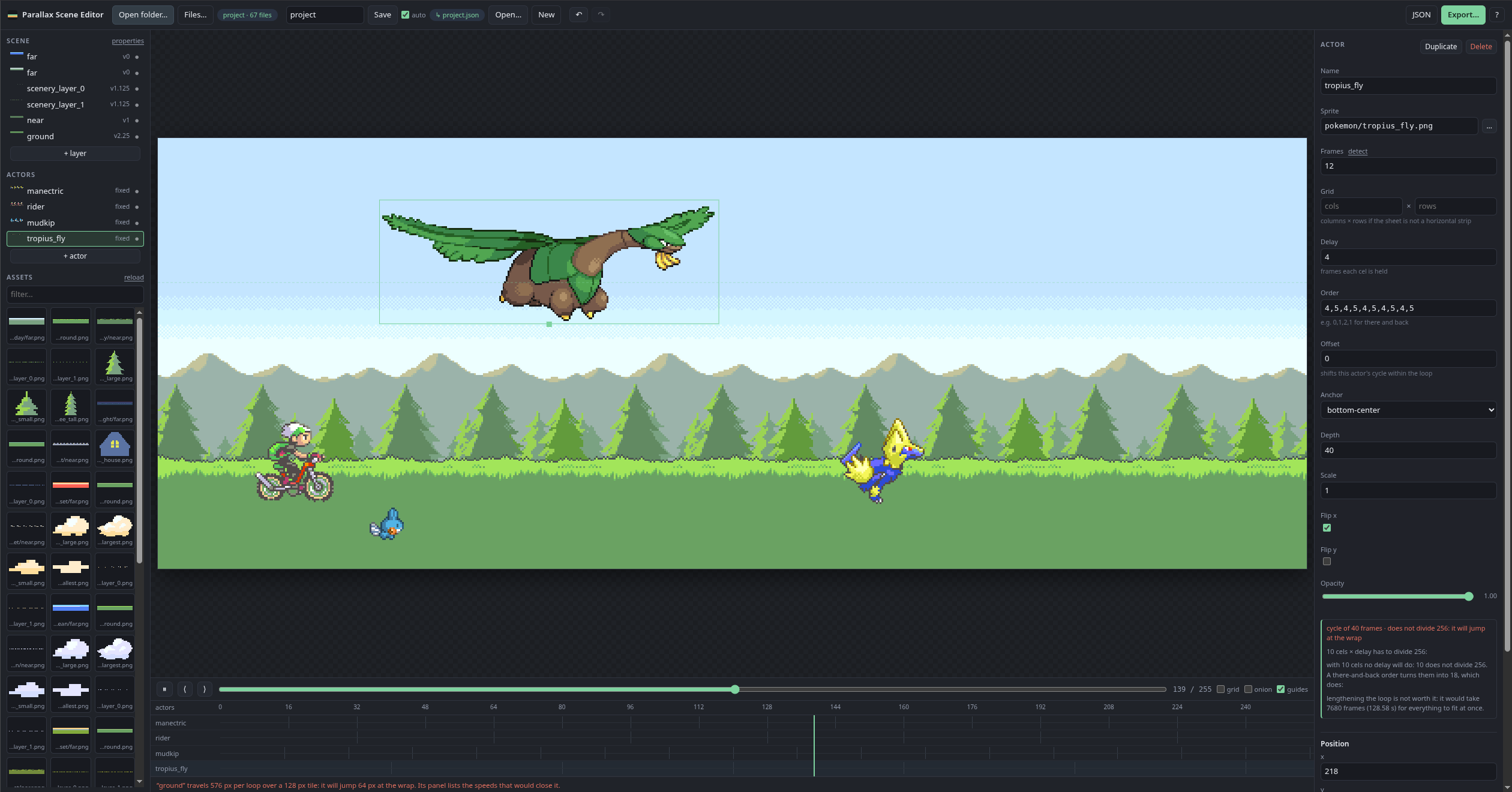
It’s fully open source, no dependencies, no build step, so GitHub Pages serves it as-is. There’s a live version at christt105.github.io/parallax-scene-editor if you want to poke at it.
Making the actual GIF
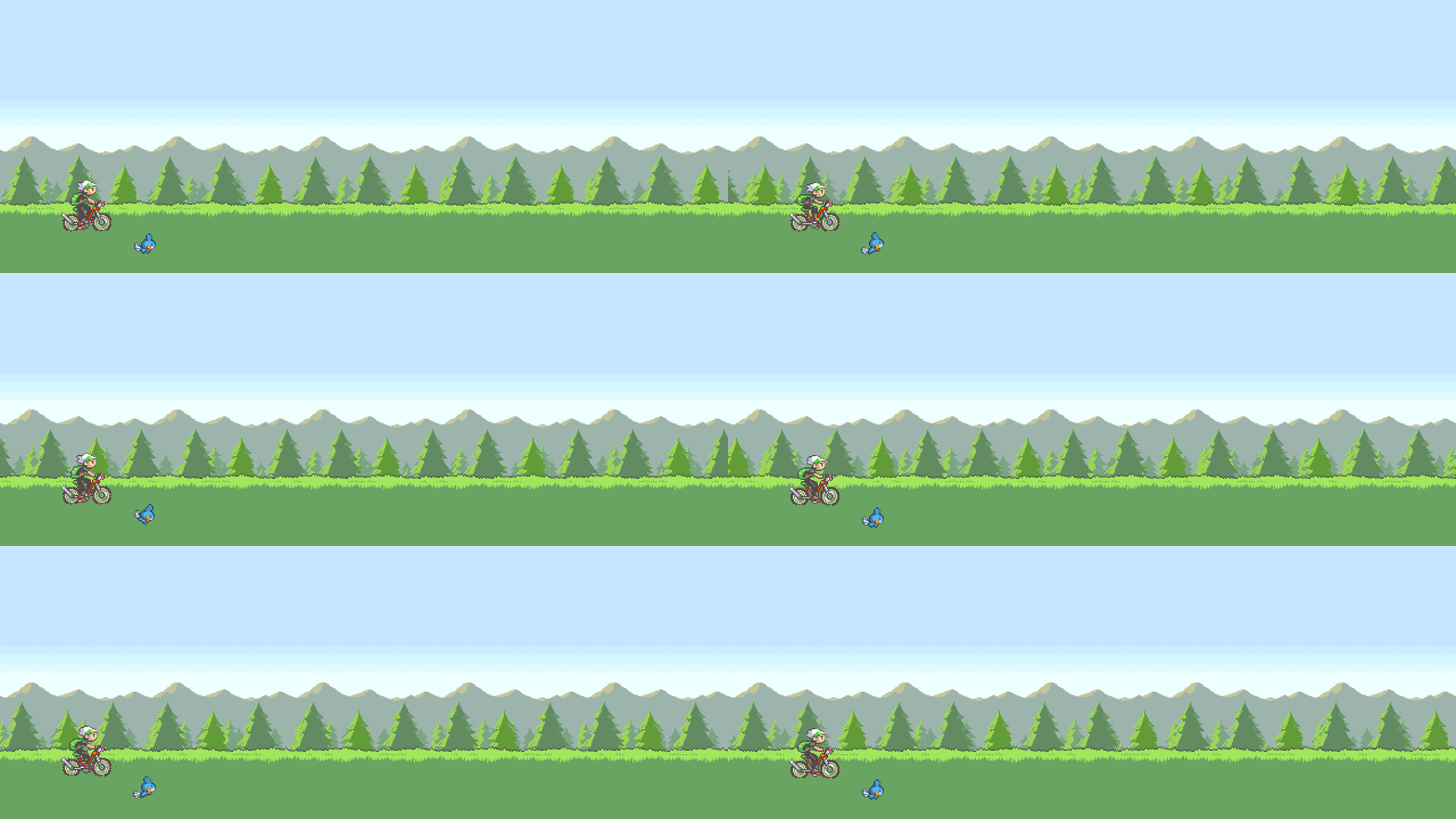
With the editor in a good enough state, I got back to the GIF itself. I kept the character on the bike, positioned it in the scene, and went looking for a running Pokémon to put next to it. I found a Mudkip spritesheet from Pokémon Mystery Dungeon that, surprisingly, matched the size and perspective I needed almost out of the box. Coincidentally, it’s my favorite Pokémon.

The one problem was the color. Mystery Dungeon’s art style is different enough from Emerald’s that Mudkip stuck out next to everything else. I asked Claude to look at the other Pokémon sprites already in the scene and adjust Mudkip’s palette to match, and the result isn’t bad, mostly around the outline.



I also tried some custom Pokémon animations I found online, but the style and perspective were too far off to blend in, so I dropped them and kept it to the rider and Mudkip running through a forest background. It would have been fun to put together a full team of six I’ve actually played with at some point, but getting sprites to that level of consistency is more than I want to take on right now. I applied a slight zoom-out and left it there, simple, but clean.
Automating the update
The editor exports to GIF and WebM, so the plan was: the Pokémon project repo exports the GIF, and the profile README references it. I wanted that to be as hands-off as possible, so I added a GitHub Action to the PokemonEmeraldIntroVideo repo that runs on every push: it checks out a build of the editor, drives it headlessly through Playwright, and commits the rendered GIF and WebM straight back to out/.
christt105/PokemonEmeraldIntroVideo
The profile README just points at that file’s raw URL. So the moment I tweak a speed or nudge a keyframe in the scene and push, the animation regenerates on its own and the README updates with it, no export-commit-push dance on my end.
The result
Description of myself, kept short on purpose, and a small list of the stack I use day to day. That gif sits right at the top as the header, which is really the whole idea: something that says a bit about me before a single word does.

The whole thing spiraled a lot further than planned, and it makes me laugh a little that I ended up building a full parallax editor just to get one animated GIF onto a profile page. I never checked whether something similar already existed, but here’s mine, open source, so anyone who wants to bend it into something else can. I’ve already got another idea for the README that’s a bit more ambitious, that one’s for another post (life permitting).
Hope you liked it, and feel free to try the editor if you’ve got a parallax scene of your own in mind.
Until next time!