Hello again!
This time I bring you a project that had been dormant for months. I’m trying to clear my backlog of paused projects to give myself some peace of mind. We’re continuing with the self-hosting theme, this time with a Telegram bot.
The Problem
The idea came about when I started using a P2P downloader, commonly known as “the mule”, on my mini PC. When a download finished, I had no way of knowing, and I had to manually go in, create the folder with the correct name in my Jellyfin library, and paste the file there, renaming it manually.
Prelude
Shortly after, I tried tinyMediaManager on Docker, but it was practically unusable from a mobile phone, which is my usual device for managing these things.
A bit later, I looked for other options and found mnamer, a command-line program that renames movies and TV shows. It was exactly what I was looking for. It uses TMDB for movies and TheTVDB for shows (which I prefer because it has better rules for some anime). With a few commands, you can make it read all the video files in a folder, rename them, and place them in the appropriate folders of your library.
I used mnamer for a while; when a download finished, I would open the command line via SSH and run an alias I had created.
| |
I had mnamer running in a Docker container and created some commands to make it work without typing too much. With mnamer-test I could check if everything was going to be renamed correctly. If it didn’t catch something properly, I’d run mnamer-tmdb or mnamer-tvdb and pass it the ID I’d look up in the browser. If everything was fine, I simply ran mnamer-run --batch so it would do it all at once. As you can see, it was still quite manual; there was plenty of room for improvement.
A few months prior, I had been tinkering with Telegram bots. I tried to create one with Python, but I ended up getting overwhelmed and switched to C# using WTelegramBot, an exquisite API for creating bots with a ton of features and in a language I felt more comfortable with. That bot is currently on pause—just another project on the never-ending list.
The Bot’s Journey
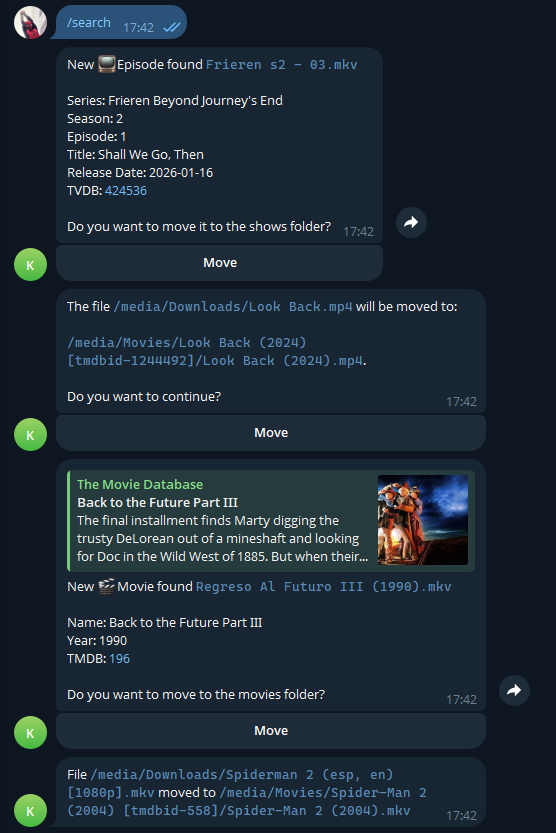
With clear ideas in mind, towards the end of last year I spent a few days working on the bot. The main idea was that every time a file appeared in a folder, the bot would send a message with mnamer’s suggestion and a link to TMDB or TheTVDB so I could verify it was correct. Once verified, pressing a button would send it to the library.
I made something very basic to check for files, send a message with mnamer’s suggestion, and include an accept button. If mnamer was wrong, I had to manually go to the hard drive, rename the file, and try again, which didn’t happen often but was genuinely annoying.
I left it like that for a few months until February, when I decided to continue. I added the File Watcher and the ability to reply with an ID to correct the match. I also tried to fix the file permission issues, and now the container runs on the 1000:1000 user by default; although it works for me, I think it’s not entirely well implemented yet.
I put it aside again because it was working quite well for me, until just a few days ago when I decided to fix a couple of things and write all the documentation so others could try it out. I configured GitHub Actions to generate a Docker image every time I created a tag, and I made the repository public.
And that’s its current state. I imagine I’ll improve it little by little if people use it, just like what recently happened when a friend sent me a PR fixing the user IDs; it’s the most rewarding part of programming. I think it’s somewhat complex to set up, but until more people give it a try, I don’t know how to make it better.
If you’re interested in the project’s source code or the installation instructions, you can find it on my GitHub account:

christt105/mnamer-telegram
Telegram bot that automates media library organization using mnamer with interactive approval workflows.
Conclusion
This is the first time I’ve built a program directly in C#; my experience with C# has almost always been within the Unity environment. I know there are many things that are wrong and can be improved upon, but I’m enjoying learning new ways to program.
Another fairly small project I can cross off my to-do list and move on to something else. If you have a similar setup and want to try the bot, I encourage you to do so and leave a star on the repository. I have published my example of how I have it set up here: https://github.com/christt105/mnamer-telegram/discussions/2.
See you in the next post!